Apple Watch
Log every set from your wrist.
Last time’s weight is already in, the Digital Crown sets the reps, and Log set saves it. Your heart rate stays on screen through every set and rest, and most rests are timed to the kind of lift. Strength, cardio and mobility, even with no signal.
Goblet Squat
Goblet Squat, set 2 of 3: 25 pounds, 12 reps, heart rate 114.
Crown: the reps
The crown sets the reps. Tap the weight to turn it instead.
Rest
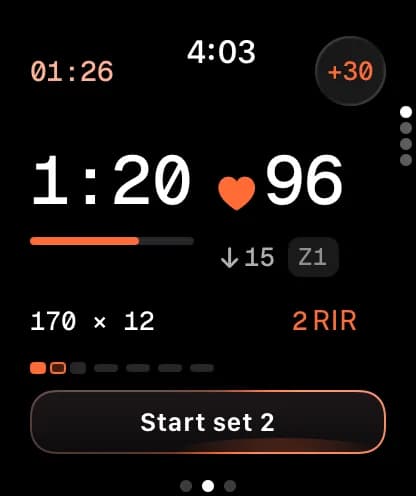
Rest timed to the kind of lift.
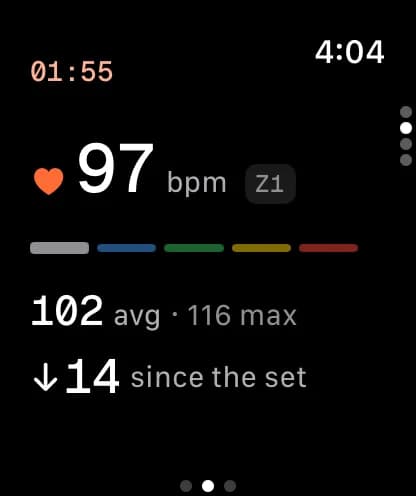
Unless your program sets its own, a squat gets two and a half to three minutes and a curl gets one; a lift with no set rest uses your default. The timer runs beside your heart rate and how far it has dropped since the set, the button lights when the rest is up, and +30 adds more.
Any order
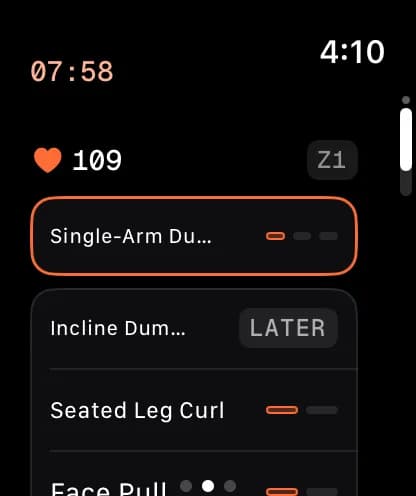
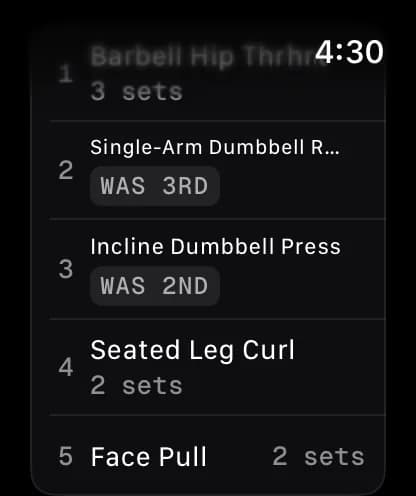
Machine taken? Do another one first.
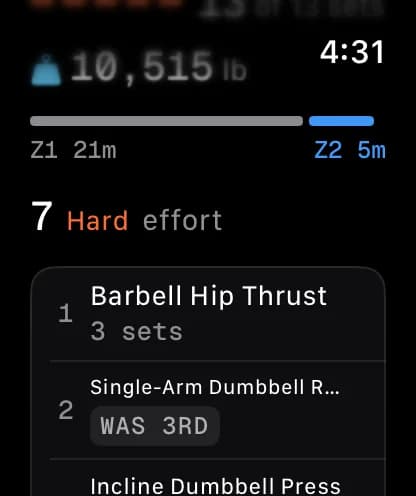
Swipe down to Today’s order and tap any exercise. The one you passed waits, marked Later, and the summary keeps the order you actually did them in. Next time your plan’s order is unchanged.
Apple Health
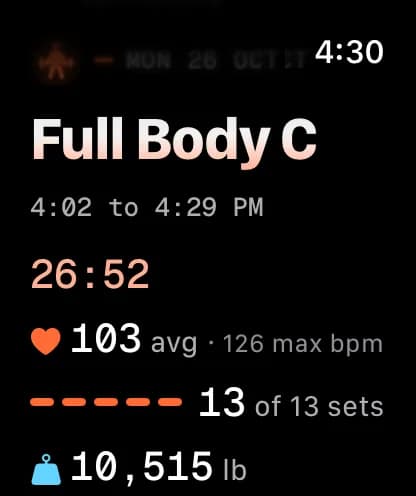
Saved to Apple Health, effort included.
Heart rate and calories are recorded the way any Apple workout records them, so the session counts toward your rings. On watchOS 11 and later, the 1 to 10 you give it when you finish is saved with the workout as its Effort.
Cardio
Cardio runs as a real workout session.
Heart rate, zones, distance and pace come off the watch's sensors and keep coming with your wrist down. Planned intervals step through on the wrist.
Quick start, one tap
- Running
- Cycling
- Walking
- Hiking
- Rowing
- Swimming
- Elliptical
- Stair Climber
- Jump Rope
Running Recording
24:31
148BPMZONE 3
2.68MI
9:09/MI
274CAL
166SPM
Intervals
- Warm-up5:00
- Work1:00
- Rest2:00
- Work1:00
- Rest2:00
- Cooldown5:00
Pain
Before Session
3
Mild
ContinueA quick check
You mentioned chest pain.
These can be signs of something that needs care quickly:
- • Chest pain or pressure that does not settle with rest
- • Fainting, or feeling like you are about to faint
Is any of this happening to you now, and new?
Mobility and safety
Say how it feels, without the phone.
Mobility sessions run on the wrist with hold timers and a 0 to 10 pain dial. Flag discomfort on a lift and its load holds next time, or dictate a note. Red-flag words bring up a safety check first.
The rest of the day
Your meals and grocery list, on your wrist.
Tick off today's meals or quick-log one, check items off in the aisle, and do your check-in or weigh-in without reaching for your phone.
Meals
1,130 cal eaten
- BreakfastOats and berries520
- LunchTurkey wrap610
- DinnerFajita bowl640
Groceries
9 left
- Chicken thighs
- Bell peppers
- Tortillas
- Greek yogurt
- Spinach
- Oat milk
- Jasmine rice
Energy
4
Swipe to continue →
Offline
No signal at the gym is fine.
Every set saves on the watch first and syncs on its own when the watch reconnects. Finished workouts are saved to Apple Health.
- Set 1140 lb × 8On the watch
- Set 2140 lb × 8On the watch
- Set 3140 lb × 7On the watch
- WorkoutUpper A, 48 minOn the watch
Questions
About the watch app.
Do I need my iPhone with me at the gym?
No. The watch runs the workout on its own and saves every set on the watch first. It syncs the next time it can reach your phone or the internet.
Which Apple Watch do I need?
Any Apple Watch on watchOS 10 or later, which is Series 4 and up. The watch app comes inside the Cadence iPhone app.
Can I talk to the coach on my watch?
No. The conversation lives on the web and your iPhone. The watch is for doing the work, and everything it logs lands in the same plan the coach reads.
Are my workouts saved to Apple Health?
Yes. Workouts you record on the watch are saved to Apple Health with their heart rate and calories. On watchOS 11 and later, the 1 to 10 effort you give a workout at the end is saved with it.
Can I log a set without touching the screen?
On a watch with double tap (Series 9, Ultra 2 and later, on watchOS 11), double tap runs the button on screen: it logs the set, or starts the next one after a rest.
What if I am not feeling well?
Tap Feeling before you start and choose Unwell. It asks about fever, chills or body aches, and a yes offers a lighter session, a skip, or the plan as written. Nothing stops you training.
Is it on the App Store?
Not yet. The iPhone and watch apps are in TestFlight while access is invite-only, and your invite brings the beta build.
Early access
Cadence is invite-only for now.
Access opens a few people at a time while the beta is small. Tell us how you train and what you want to change, and we'll come back to you.
Web, iPhone and Apple Watch · One invite covers all three